NPS surveys: how to run one, calculate your score and act on it
What Net Promoter Score measures, the two questions that make an NPS survey useful, how to calculate NPS, and a free NPS survey template.
The KyraForm team 3 min read
Net Promoter Score (NPS) is one number that tracks how customers feel about you over time. It’s popular because it’s short to answer and easy to compare, and it’s often run badly because the score alone tells you very little. Here’s how to run an NPS survey that you can actually act on.
The NPS question
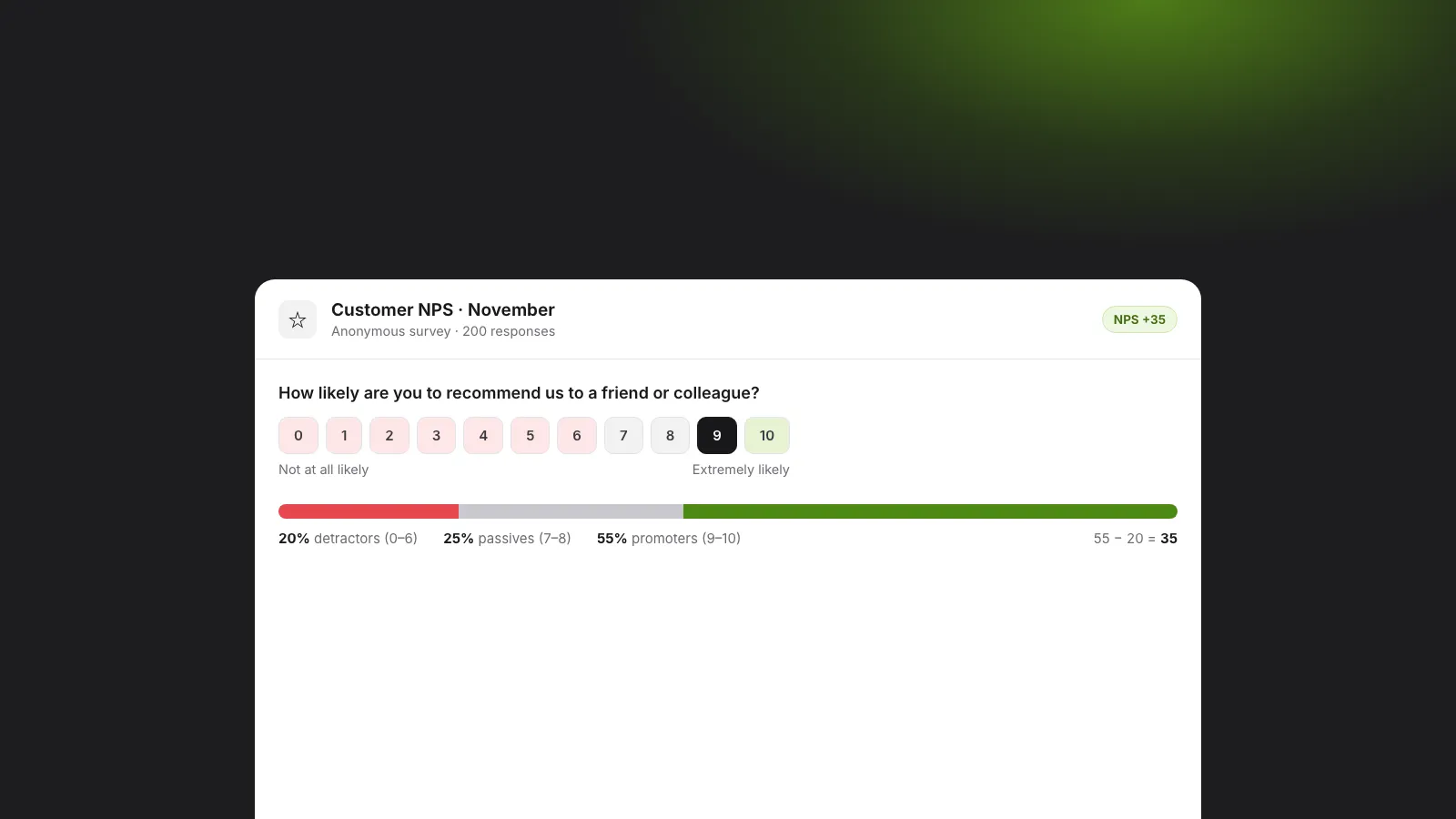
Every NPS survey starts with the same question:
How likely are you to recommend us to a friend or colleague?
People answer on a scale from 0 (not at all likely) to 10 (extremely likely). Name your product or company instead of “us”, and keep the wording the same every time you run it, so the numbers stay comparable.
How to calculate NPS
Answers fall into three groups:
| Score | Group | What it usually means |
|---|---|---|
| 9–10 | Promoters | Happy, likely to recommend you |
| 7–8 | Passives | Satisfied but not enthusiastic |
| 0–6 | Detractors | Unhappy, may warn others off |
NPS = % promoters − % detractors. Passives count towards the total but not either side.
Say 200 people answer: 110 promoters (55%), 50 passives (25%) and 40 detractors (20%). Your NPS is 55 − 20 = 35. The score runs from −100 to +100.
You don’t have to work this out by hand. In KyraForm the NPS question is a survey question type, and the survey report calculates the score and shows promoters, passives and detractors for you.
The follow-up questions matter more than the score
A score of 35 doesn’t tell you what to fix. Add one or two open questions:
- What is the main reason for your score? This is where the useful answers are.
- What is one thing we could do better? Optional, but it gives detractors and passives a concrete place to start.
Keep it there. Every extra question lowers the number of people who finish. KyraForm can summarise the open-text answers with AI, so you can read the themes before you read every comment.
Anonymous or identified?
- Anonymous gets more honest answers, especially from unhappy customers. KyraForm’s strict anonymous mode stores no name, email, raw IP address or browser details, and the setting locks once the first response arrives.
- Identified lets you follow up with detractors personally, which can turn some of them around.
A common compromise: run it anonymously, and add an optional “Can we contact you about your answer?” question with an email field in a separate, identified survey for customers who opt in.
When to send it
- Relationship NPS: every three to six months to all active customers, to watch the trend.
- Transactional NPS: a day or two after a purchase, a support ticket or onboarding, to judge that moment.
Don’t send it more often than people can notice a change, and always to the same kind of audience, or the trend won’t mean anything.
What’s a good NPS?
It depends heavily on your industry and region, so compare yourself with your own past scores before anyone else’s. Anything above zero means more promoters than detractors. Moving from 20 to 35 over a year says more than any benchmark.
Run your first NPS survey
The free NPS survey template has the score question and both follow-ups, set up as an anonymous survey. Use it as it is, or change the wording and publish. Share it by link, email or QR code, or embed it on your site.
For engagement surveys inside your team, the anonymous employee survey template uses the same idea with eNPS (“How likely are you to recommend this company as a place to work?”). See online survey maker for every survey question type, from CSAT and CES to Likert grids and ranking.